
Review Board 8.0 Release Notes
Release date: May 27, 2026
This release contains all bug fixes and features from Review Board version 7.0.6.
Installation/Upgrade
Review Board 8 is compatible with Python 3.8 - 3.13.
These are the same requirements as Review Board 7, making upgrades to 8 easy.
Follow our installation guide to prepare your system for Review Board or to upgrade your existing install.
To install this release, run:
$ pip3 install ReviewBoard==8.0
To learn more, see:
New Subscription Plans
You can now choose one of three plans for Review Board:
Review Board Community Edition
The same open source Review Board you’ve always used, with support managed by your own team.
Review Board remains committed to open source.
Review Board Plus
Review Board with Basic Support included, and the following additional features:
Document review and diffs for Microsoft Office, Google Docs, LibreOffice, and PDF files
Code review reports
User role management and automation rules
Integration with Azure DevOps, Bitbucket Data Center, ClearCase, GitHub Enterprise, and Keysight SOS
Database import/export for spin-offs, acquisitions, and mergers
Improved server scalability
Basic Support includes:
Next-business-day response
Support for the latest version of Review Board and companion products
Installation and troubleshooting assistance
All for $12 USD/user/month (with annual billing).
Review Board Enterprise
All the features of Review Board Plus, but with Premium Support for installs that are critical to your business.
Premium Support includes:
Same-day (usually same-hour) response guarantees, 7 days a week
Priority fixes for bugs
Support for any version of our products
Maintained custom builds
Emergency repairs, 24/7/365
Help with internal development of Review Board extensions and tools
Large-scale deployment analysis and assistance
Video and telephone-based support (by appointment)
All for $15 USD/user/month (with annual billing).
When you upgrade to Review Board 8, you’ll be asked whether you want to stay on your self-supported Review Board Community Edition or upgrade to Review Board Plus or Enterprise with support for your server.
Monthly and annual payment options are available. Cancel any time. Multi-year discounts are available upon request (contact sales@beanbaginc.com).
All subscription licenses can be managed in your Review Board administration dashboard under Administration UI -> Licenses.
Note
This replaces our old add-on model for support contracts and Power Pack licenses. If you’re on an older version of Review Board, those options are still available.
If you’re an existing paying customer, you can stay on your current plan. Contact us before you upgrade to Review Board 8 so we can issue you a license for your server.
Important
Once you upgrade to Review Board Plus or Enterprise, you will need to assign existing users to your license through Admin UI -> Per-User Licenses.
You can Import users to populate your license with your existing users.
New users will be added to your license automatically.
New Features
Office Document Review
Review Board can now be used to review documents, presentations, and more, whether those documents are files you’ve uploaded or they’re part of your diff.
The following documents are supported:
Microsoft Office
Google Docs
LibreOffice/OpenOffice
All PDF documents
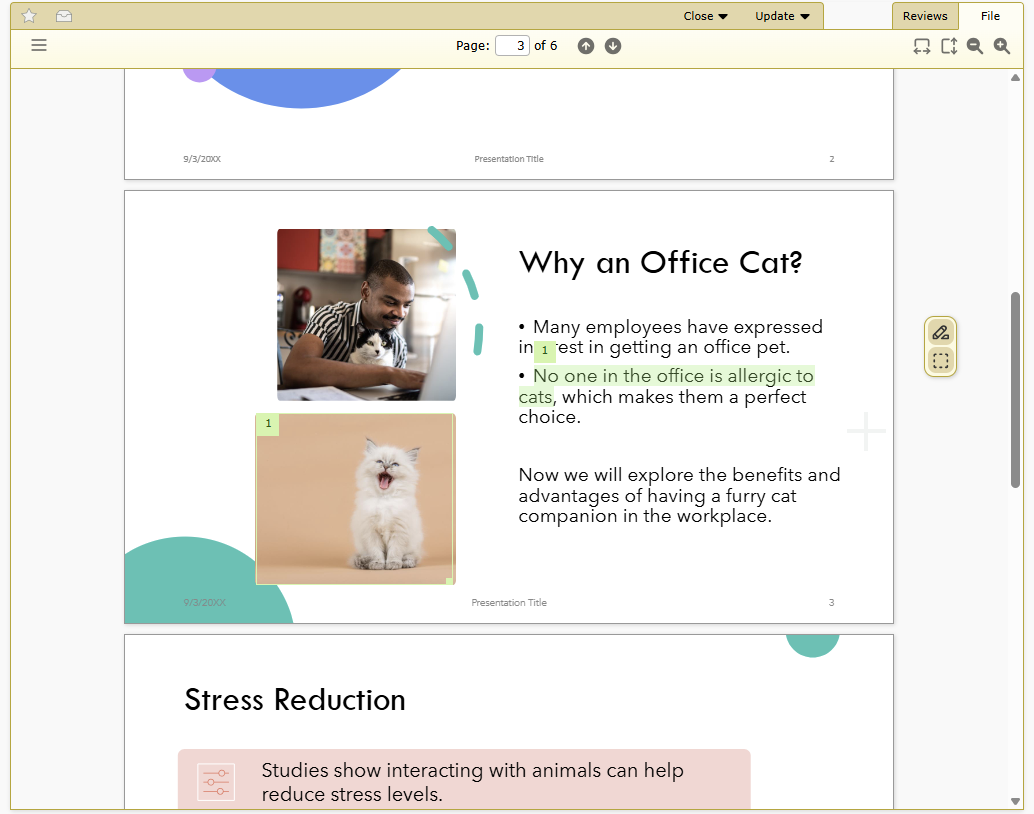
Comments can be made by selecting text or by drawing a box over a region of the document and leaving a comment.
Reviewers can see a diff between each update of a document, showing a side-by-side view that highlights all of the text changes.

Learn more about using Document Review.
Note
Document Review is part of a Review Board Plus and Enterprise subscription.
To use Document Review, you will need to install a microservice and message broker to handle document processing. This is available as a container for Docker and compatible services.
User Roles and Badges
User Roles are a flexible way to identify a user’s responsibilities and position in an organization, and help craft policy and automation rules.
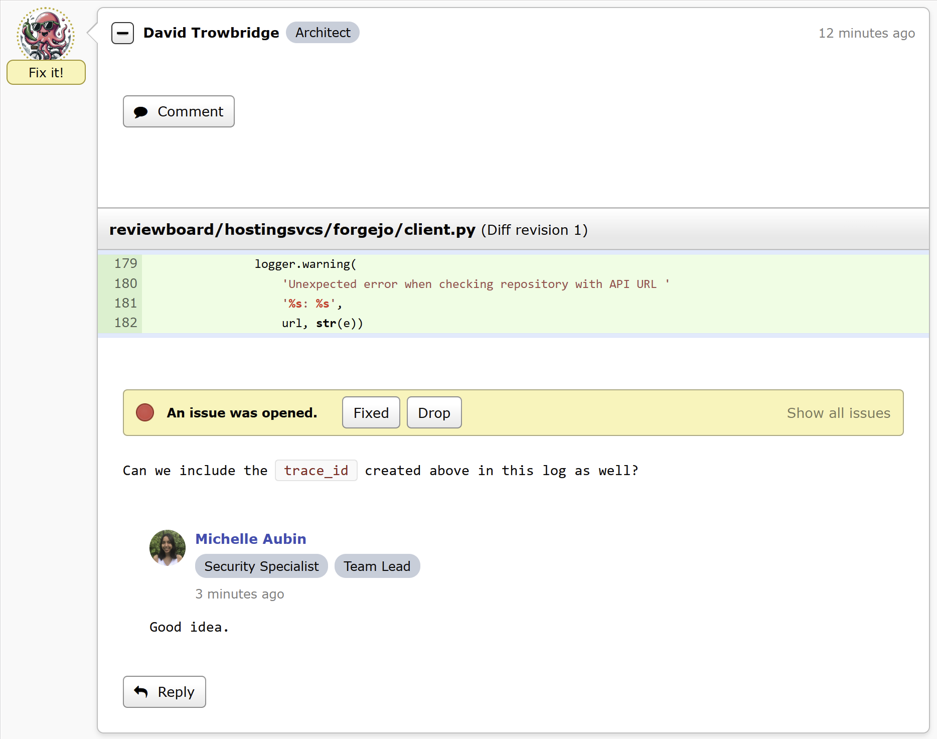
Administrators can create roles and assign them to any number of licensed users. These can be used when configuring integrations or writing custom approval hooks. They’ll optionally appear as badges alongside the user throughout the UI.
Note
User Roles are part of a Review Board Plus and Enterprise subscription.
Writing Assistance – Spell Checking, Dictation, AI
You can now use your browser’s built-in writing assistance features, including spell checking, voice dictation, AI rewriting, and any other capabilities you would normally have available to help write text.
This is available when writing a comment, a review request description, or any other text field in a review or review request.
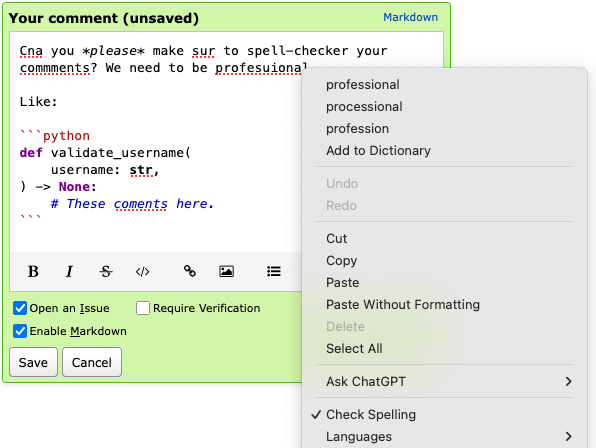
This feature is dependent on your browser, and is experimental. To enable it:
Go to My Account -> Settings.
Set Enable writing assistance for Markdown text fields.
Quick Access Actions for Reviews
You can now pin your most frequently-used review-related actions to your Review Banner.
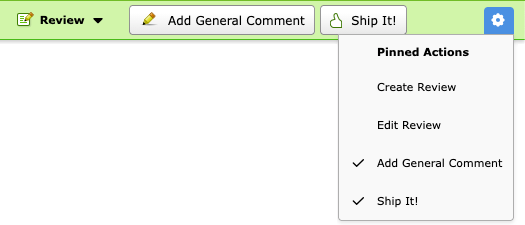
The following Quick Access actions can be pinned:
Create Review
Edit Review
Add General Comment
Ship It!
These will be readily available on your review banner at the top of the window.
Ship It! Confirmation
Users can now control whether to prompt for confirmation when clicking Ship It!.
To change this setting:
Go to My Account -> Settings.
Change Prompt to confirm when publishing Ship It! reviews.
Enhanced Interdiff Filtering
Review Board has supported interdiffs since Review Board 1.0, and has also supported filtering out of upstream changes made in-between two diff uploads.
Review Board 8 introduces the all-new version 3 of our algorithm for filtering out upstream changes, featuring:
Better filtering out of upstream changes, letting you focus on just the changes you need to see.
A new approach that’s no longer sensitive to how the uploaded diffs might be generated.
If you encounter any issues with interdiffs going forward, please contact us at support@beanbaginc.com.
New Integrations
Forgejo
Review Board now supports reviewing code on Forgejo.
Forgejo is an open source code hosting platform similar to GitHub and GitLab, available for free in your own network.
You can use Review Board to review your code on Forgejo, right alongside your code reviews for GitHub or any other supported service.
RB Gateway 2.0
Review Board can work with self-hosted Git repositories using the all-new RB Gateway 2.0.
This is a microservice that provides a Review Board-compatible API for your on-prem Git infrastructure, letting you post and manage review requests, browse for commits, and auto-close review requests on push.
GitLab CI
You can now connect Review Board to your GitLab CI, triggering a build whenever a review request is posted.
GitLab CI builds can be run automatically, or can be set to run only when clicking a Run button.
Based on work by André Klitzing.
New Administrative Features
Control over Ship It!
Administrators can now prevent users from assigning a Ship It! to their own review requests.
This is off by default so that there are no surprises, but administrators are encouraged to turn this on.
SSL/TLS Certificate Storage
In-house source code repositories and authentication backends can now store
and use self-signed SSL certificates in your site directory’s
data/ directory. This can be used instead of installing these
certificates system-wide.
Currently, installation of new certificates or bundles requires placing them in a specific location. Future versions will add a configuration page for managing your certificates.
CIDR Subnets for Health Checks
The /health/ URL can be used to monitor the health of your Review Board
server. This is restricted to the monitoring IP addresses you have specified.
Now you can include CIDR blocks as well as individual IP addresses. This is particularly useful for Kubernetes and other scaled-out deployments.
Performance Improvements
Greatly reduced the time needed to perform a full search index.
Reduced the number of database queries used when showing a review request.
Improved performance with checking for starred review requests and groups on the dashboard and review requests.
Performance-related issues are now identified and logged when communicating with source code repositories, e-mail servers, integrations, and other external services.
Improved hints to search crawlers to reduce the set of pages that are indexed.
Usability Improvements
Review Board now automatically matches the system’s Light and Dark Mode themes for all users.
Users can explicitly choose Light or Dark Mode through their Appearance settings.
Added Dark Mode throughout the rest of the product.
Improved touch screen interaction with drop-down menus.
Modernized and standardized the look and presentation of most of our dialogs.
Bug Fixes
Installation
Fixed setting the configured cache server when creating a brand-new Review Board install.
Automated Reviews
Fixed the owner of a review request not being able to manually run an automated review.
The manual Run button is no longer present if the user doesn’t have permission to run an automated review.
Diff Viewer
Fixed a bug showing reverted binary files in interdiffs.
Fixed a crash when trying to download newly-added empty files.
Fixed an incorrect display when showing new files with the same name as one that was deleted in a parent diff.
Search
Fixed navigating to the last page of search results.
Administration UI
Fixed being able to archive repositories that were no longer accessible.
Sending a test e-mail on the E-mail Settings page now respects all the server’s e-mail settings.
Web API
Added a
sha256_checksumfield on File Attachment Resource representing the SHA256 checksum of the uploaded file.Added
orig_sha256andpatched_sha256fields on File Diff Resource representing the SHA256 checksums of the original and patched files.This applies to both text and binary files.
Extensions
Review Board 8 builds upon Django 4.2 and Djblets 6.
See the Djblets 6 release notes for a list of changes useful to extension authors.
Modern Python packaging
Extensions can now use modern pyproject.toml files for their packaging.
To support this, add the following to your file:
[build-system]
requires = [
    'reviewboard~=<version>',
    'reviewboard[extension-packaging]',
]
build-backend = 'reviewboard.extensions.packaging.backend'
rbext create will create this automatically for you if making a new extension.
If you have an existing setup.py, it will continue to work as-is.
Modern default extensions with rbext
The rbext command is used to create and test your extensions.
rbext create has been updated to create a better boilerplate extension for you to customize.
Improved action framework for UI customization
Review Board provides an Actions framework for customizing parts of the UI, allowing extensions to include new buttons and menus for navigation and interacting with review requests.
We’ve made significant improvements, including:
A new model for creating and rendering actions on the page, letting one action be used in multiple places (including as both buttons and menu items).
Creation of Quick Access actions that appear on the banner that’s shown when reviewing changes.
Actions that customize the administration UI sidebar.
Simple custom columns for the Dashboard
It’s now easier than ever to create custom columns for the Dashboard.
Creating a column used to require carefully overriding the column’s constructor and passing a series of arguments to the parent. Now, they can be set right on the class as attributes.
Custom choices for condition rules
Extensions can provide choices to add to any condition rules, such as those used to configure integrations. These can be used to trigger automation rules such as Continuous Integration builds or Slack notifications.
New signals for reviews
The new reviewboard.reviews.signals.comment_issue_status_updated
signal will be emitted whenever someone resolves, drops, or re-opens an issue
on a comment.
Contributors
André Klitzing
Christian Hammond
Daniel Casares-Iglesias
David Trowbridge
Michelle Aubin