
Power Pack 6.0 Release Notes
Release date: May 27, 2026
Installation/Upgrade
Power Pack 6 is compatible with Review Board 6, 7, and 8, and Python 3.8 - 3.13. This release drops support for Review Board 5.
Some of Power Pack’s repository integrations require Review Board 6.0.3 or higher. You must use Review Board 6.0.3 or higher if you have repositories on any of the following services:
Azure DevOps Server (formerly known as Team Foundation Server)
Azure DevOps Services (formerly known as Visual Studio Team Services and VisualStudio.com)
Keysight SOS (formerly known as Cliosoft SOS)
IBM ClearCase and HCL ClearCase (formerly known as HCL VersionVault)
Follow our installation guide to prepare your system for Review Board or to upgrade your existing install.
Power Pack 6 is included as part of Review Board 8.
To install on Review Board 7 or earlier, run:
$ pip3 install ReviewBoardPowerPack==6.0
Make sure to use the correct version of pip for your system.
To learn more, see:
Power Pack is included in paid on-prem Review Board plans and in the Business RBCommons (hosted) plan. See the plans page to trial or purchase a plan.
Standalone licenses are available for existing installs. Contact sales@beanbaginc.com to inquire.
New Features
Office Document Review
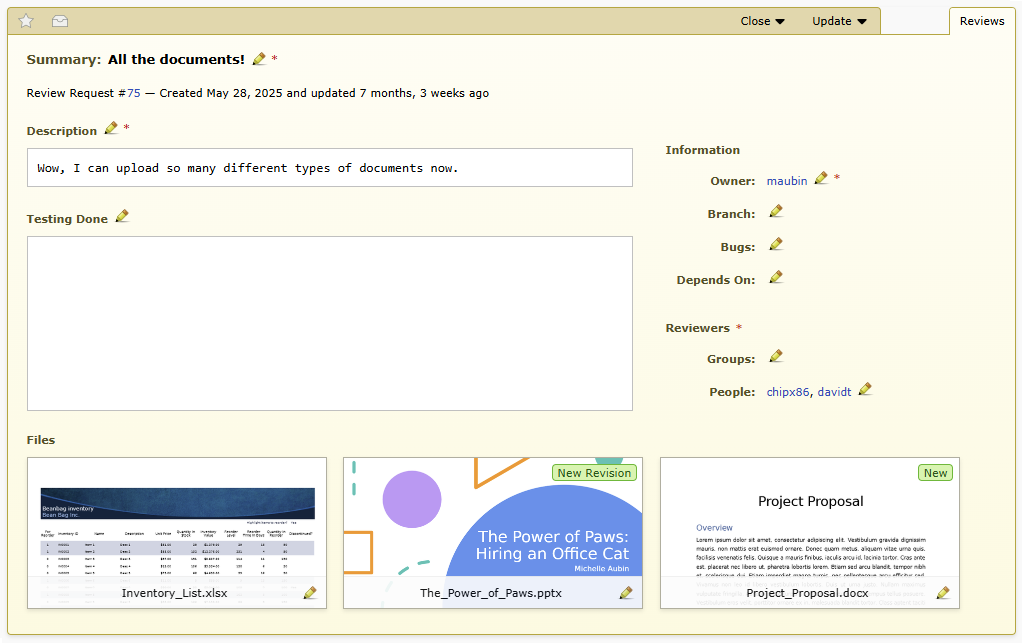
Power Pack 6 expands document review beyond PDFs, adding support for:
Microsoft Office documents (Word, Excel, PowerPoint)
OpenOffice/LibreOffice documents (Writer, Calc, Impress)
Google Workspace documents (Docs, Sheets, Slides)
These files can now be uploaded directly to Review Board and reviewed in the same rich document viewer used for PDFs. Review Board will automatically convert these files to PDF for display and review, and the PDF versions can be downloaded.
This feature requires some initial setup. See the documentation for more details.
Improved Document Viewer
The document viewer has been refined to make reviewing all types of documents easier and more intuitive.
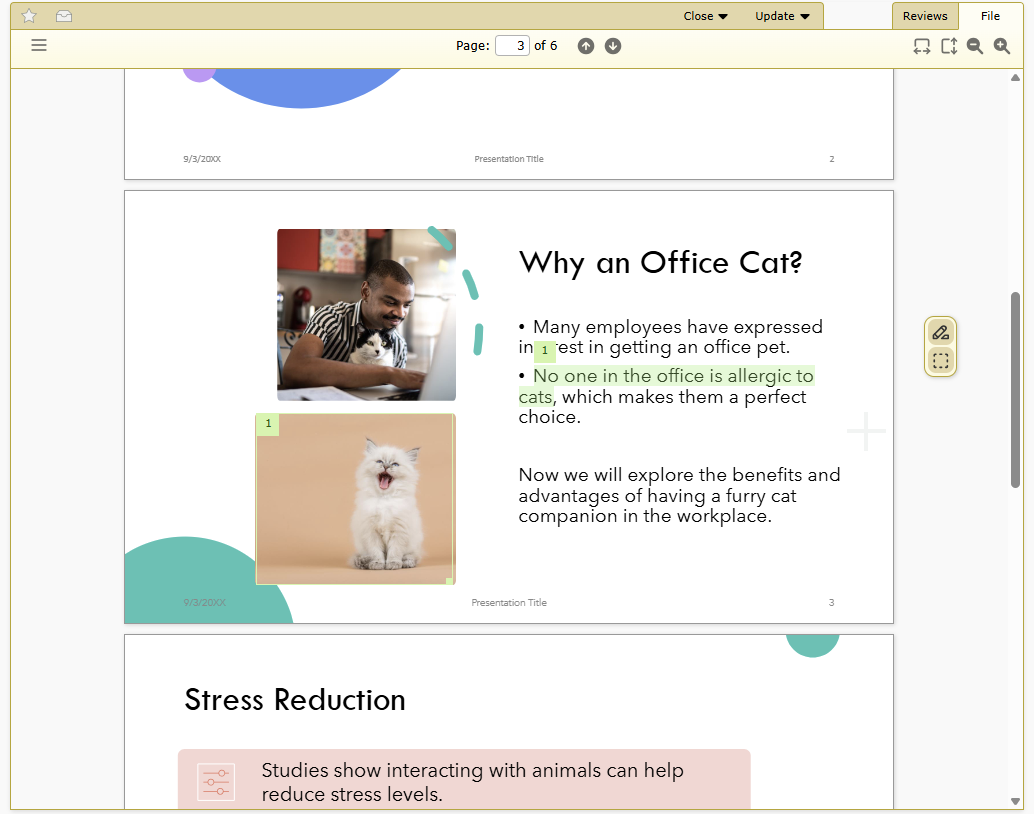
Text selection comments
You can now create text selection comments, highlighting exact portions of text to comment on. Document text is selectable, copyable and searchable within the viewer, and links are now clickable. This provides a much better experience when reviewing text-heavy documents like reports or proposals.
Comment mode toolbar
A new toolbar appears along the right side of the viewer, allowing you to toggle between the different commenting modes:
Region comments for commenting on regions of the document
Text selection comments for commenting on text in the document
Pan mode (on mobile) for smooth scrolling without creating comments
These modes help reviewers focus on the right context when reviewing documents, and prevent accidental comments while navigating.
Zoom-to-fit controls
Zoom-to-fit controls have been added in the document viewer’s header. These let you quickly adjust the display to fit the full page width or height of the document.
Better mobile document review
Mobile document review now feels a lot smoother and more responsive. Controls are better spaced, commenting is easier to manage, and layout adjustments provide a more touch-friendly experience.
Inline document review
If you are posting changes from a repository that include Office or PDF documents, these files will now be reviewable directly in the diff viewer.
This is only available on Review Board 8.0 and higher, for changes posted using RBTools 5.0 and higher.
PDF Compatibility
There are bug fixes, security fixes, and stability improvements for handling PDF documents.
User Roles
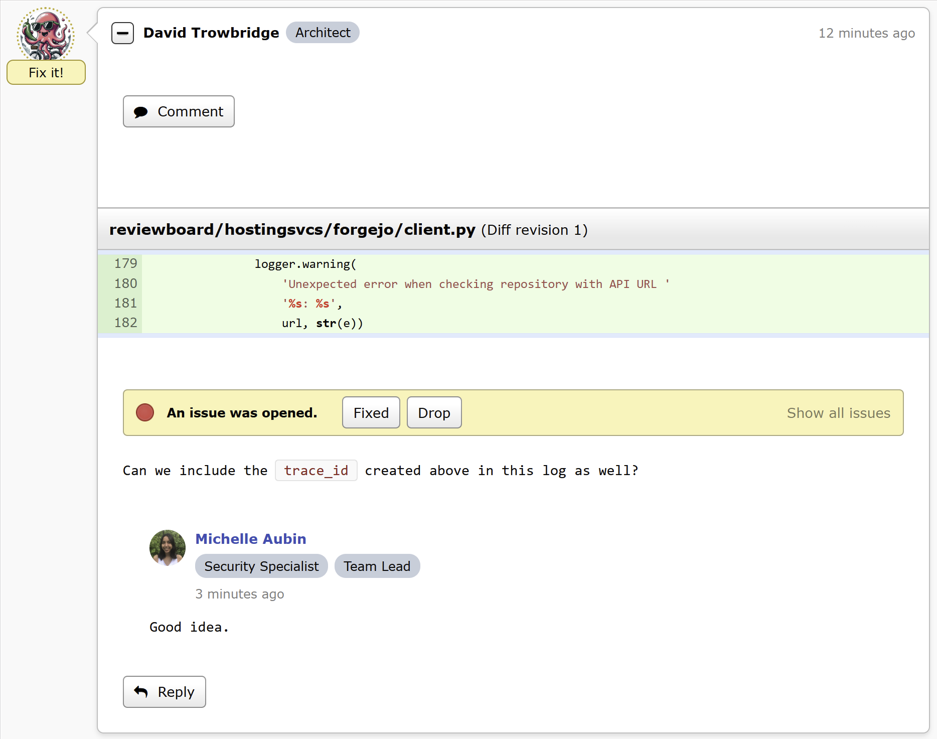
User roles are a flexible way to identify a user’s responsibilities and position in an organization, and help craft policy and automation rules.
Administrators can create named roles (e.g. Product Manager, QA Tester, Architect) and assign them to any number of users. Roles can optionally display a badge next to the user’s name throughout the UI.
These roles can be used when configuring integrations or writing custom approval hooks. For example you can enforce that each review request must be approved by at least one Team Lead, or you can trigger a certain integration to run whenever a QA Tester publishes a review.
User roles are only available on Review Board 8.0 and higher.
Improved Admin Configuration
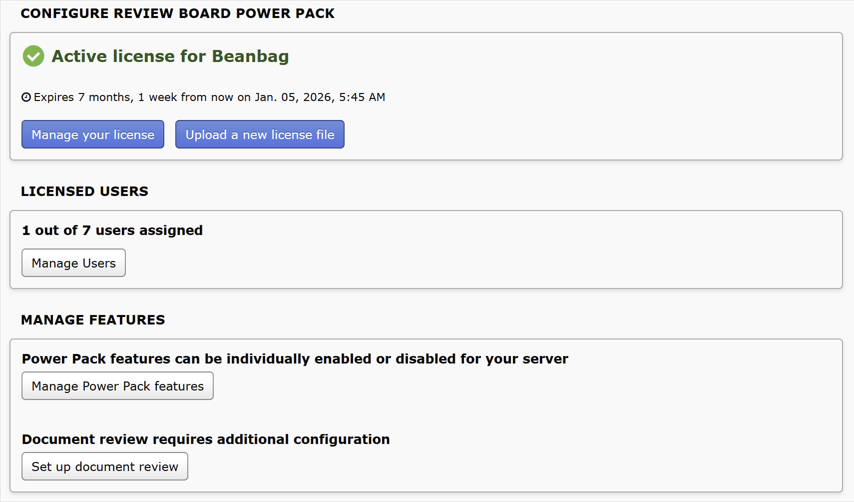
We’ve revamped the Power Pack administration UI to make managing your license and settings easier.
On Review Board 8.0 and higher, the admin sidebar now has new entries for quicker access to Power Pack related settings:
Per-User Licenses: Assign and manage which users get access to licensed features.
Document Review: Set up document review functionality.
Power Pack Features: Enable or disable individual features from Power Pack.
User Roles: Create new roles and assign them to users.
On all supported Review Board versions, the Power Pack configuration page now has:
A clearer view of license status, user seat usage, and where to access the user management page.
Separate, cleaner pages for managing features.
Better visuals and dark mode support (Review Board 8.0+).
Repository Integrations
The following repository integrations have been updated to use their product’s modern name:
Cliosoft SOS is now Keysight SOS
Bitbucket Server is now Bitbucket Data Center
HCL VersionVault is now IBM ClearCase and HCL ClearCase
Team Foundation Server is now Azure DevOps Server
Visual Studio Team Services / Visualstudio.com is now Azure DevOps Services
The configuration instructions for these integrations have been modernized as well.
Added support for post-commit review on Bitbucket Data Center repositories.
This allows for browsing and creating review requests from commits that have already been pushed to the repository.
Bug Fixes
Administration
Fixed a bug that was preventing users from being removed from the license unless the Usernames field was filled in.
Fixed bugs in removing users from a license when there are more users assigned than user seats.
Fixed problems with license update checks sometimes failing for servers that have a valid license.
Document Review
Fixed a bug where the contents of the navigation sidebar would sometimes still be visible when collapsed.
Allowed documents to be displayed at high zoom levels on mobile. Previously, zooming too much would lead to a black screen in the document viewer.
Fixed thumbnail generation for large, high quality documents.
Fixed a bug where pages would sometimes fail to render when viewing the diff between document revisions.
Made it easier to see small comment thumbnails in reviews and the review dialog.
Reports
Improved colors for chord graphs in dark mode.
Repository Integrations
Prevented crashes when binary files are included in Azure DevOps Git post-commit review requests.
Fixed problems with creating post-commit review requests from initial commits (the first commit in a repository) on Azure DevOps Git repositories.
Added more graceful error messages when interacting with Power Pack hosting services while Power Pack is disabled.