
Document Review Settings
New in version 8.0.
This page (Admin UI -> Settings -> Document Review) is used to configure Review Board’s Document Review feature.
Document Review allows users to review documents, presentations, and more, whether those documents are files attached to a review request or part of a diff.
Document Review requires a Review Board subscription
It’s included in a Review Board Plus or Enterprise subscription, and with a legacy Power Pack license.
Broker Settings
The following settings are available:
Broker URL
The URL to the message broker used for sending new documents to the Doc Converter microservice.
This is in the form of:
amqp://username:password@server:port/vhost
If you use Review Bot, you can use the same message broker.
See Document Review for details on setting up your message broker and Doc Converter microservice.
Doc Converter Message Broker Status
Once a broker is configured, you can see the status of any Doc Converter microservices that are available to handle document processing.
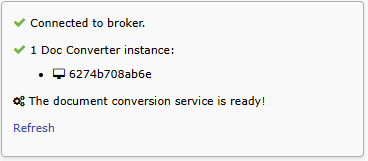
Click Refresh to initiate a new scan for the broker and workers.