
Uploading File Attachments
New in version 1.6.
Any type of file can be added to a review request. Log files, binaries, test data, audio, or anything else. These files can be downloaded by other people. This is especially helpful for files that are part of a change but can’t be represented in diffs.
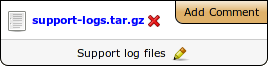
Comments can be made on file attachments by clicking Add Comment. These comments apply to file attachments as a whole. See Reviewing File Attachments for more information.
There are two ways to upload a file attachment:
Click Add File on the action bar, browse for the file to upload, and optionally enter a caption for the file.
Drag the file from your file manager into the review request.
When dragging over the browser window, a black overlay will appear, showing you where to drop the screenshot to upload it. You also have the option of uploading a screenshot.
When you drop the file, the overlay will disappear and the file will upload.
You can drag and upload multiple files at a time.
Note that this requires a modern HTML5-capable browser, such as Google Chrome or Firefox 3.6+.